• I ran into a "blocking function" in getting IMAP working with Outlook 2013 recently.  There is a feature in Outlook 2013 that requires you to Test Account Settings … before an IMAP email account will be created the first time.  The testing is mandatory with no apparent way to turn it off.

    It turns out that the IMAP server I was trying to connect to has a digital certificate issue that prompts via GUI a user acknowledgement to agree to use the certificate.  However, when you are doing a Test Account Settings  … setup the first time the certificate dialog never comes up and the testing fails. A failed test means the account won't be created.

    The work around I found was to create a working IMAP connection using my GMAIL account, and then re-editing the IMAP settings for the server that I wanted to connect to.  And in that case you can turn off the Test Account Settings option.

    + , , , ,
  • Carson-steve-corndogs1

    A while back (just after Christmas) Carson and I made our own version of the following corn dog recipe from the Skinny Fork called "Baked Whole Wheat Corn Dogs.".

    We basically kept the main parts of the recipe but didn't do the following:

    • No Brown Sugar
    • No Paprika
    • No Cayenne
    • No Chili Powder
    • No Poppy Seeds

    We also did half the recipe getting 6 turkey corn dogs and not the 10-12 turkey corn dogs if you follow the recipe.

    They turned out great, but they did need a good helping of either ketchup or mustard depending on your taste.  Making them very plain and then seeing what we could do with them in the future was our plan.  

    I think adding the spices/flavors would be good for anyone without picky kids. I also think these would be great with Hebrew National hot dogs or a pre-cooked sausage.

    By the way, the picture above was the 2nd picture.  Here is the 1st picture with an expert photo bomb from Conrad —

    Carson-steve-corndog2


    + , , , , ,
  • Veggie-pancake-recipe

    There was a recent Zucchini Pancakes recipe in the Union Tribune.  I thought it sounded good, but I figured I might be able to make it simpler with more basic ingredients.

    So I got the following: 1 yellow squash, 1 Italian squash, 1 yellow onion, 1 sweet potato, and 1 jalapeno.  I then grated them all into a big bowl and mixed them all together (aka the 'veggie mix'). 

    Then I scooped 3 cups of the veggie mix into another mixing bowl, added 1 egg, and a half-cup of Italian bread crumbs.

    I then cooked these in a skillet (high heat) until golden brown on both sides using standard canola oil.  This made about 7 pancakes and they turned out great. 

    I then took what was left over in the grated bowl (~3 cups) and made another batch.  I cooked these using Kirkland Canola Oil Cooking Spray.  I think these actually turned out better and probably slightly more healthier.

    I think the Jalapeno is the key special ingredient that added the majority of the flavor that the original recipe had by adding several spices.  I'm sure you could tweak the flavor based on what your tastes are – garlic, salt & pepper, more onion, etc.

    + , , ,
  • I got asked the other day at work on how I studied to pass the Certified Information System Security Professional (CISSP) back in Dec 2011. While I was relaying my experience, I made a few notes, and I figured it would be good to document the endeavor in a blog post.
    AFC79C51-1617-4C5A-85ED-C70FE57E43BF

    I think my main advantage was that I was able to get access to SANS Management 414 class via their self-study content using training dollars from work [direct link for more info].  While expensive, the 'do it on your own time' offering was much better for me than going to a class (which can also be expensive). 

    One of the other key features that I liked about the self-study offering was there were seperate MP3s of all the sessions plus the online course review material.  This allowed me to binge listen to the audio content during my daily exercise, drives in the car, and while on travel (which happend about 5 times during my prep time before the test). The only bad news about all this 'listening' is that when I have a CISSP related nightmare I still hear Dr. Eric Cole's voice.

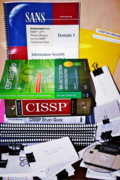
    The package included printed slides for all the material (sync'd online to the audio feed): [Domain 1 – Information Security Governance & Risk Management; Domain 2 – Access Controls; Domain 3 – Cryptography; Domain 4 – Physical Security; Domain 5 – Systems Architecture & Design; Domain 6 – Business Continuity & Disaster Recovery Planning; Domain 7 – Telecommunications & Network Security; Domain 8 – Application Security; Domain 9 – Operations Security; Domain 10 – Legal, Regulations, Compliance, & Investigation], and a copy of the following book – "CISSP Study Guide" by Eric Conrad, Seth Misenar, Joshua Feldman. Also included was a series of pre-tests both online and paper and then a full practice test that was online.

    Other books I used for reference included:

    Once I went through all the material one time via MP3/Slides, I then deteremined when there was a class about 16 weeks/4 mouths in the future and signed up for that one.  I found it very useful to have a target date on the calendar to motivate me to block out time for studying.  I then spent every Off-Friday from work and ~4 hours each Saturday and Sunday studying the material up to the test week.  The test was on Tuesday and I pretty much studied full time Friday, Saturday, Sunday, and Monday before the test.  If my math is correct that was about ~250 hours of studying (not including the MP3 material listening which I continued doing during my exercise, driving, etc times up to the test).

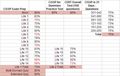
    In addition to the study reference material above, I also took a great deal of practice tests.  If there was a test I could take I took it. My prevous experience getting a Windows OS certification and Security+ was that there was a ton on of value in reviewing as many questions as possible. This turned into a a pretty detailed stats tracking on how I was doing and where I needed extra focus.  Here is the "final" view of my spreadsheet tracker I setup in Google Docs:

    Cissp-test-tracking-1Cissp-test-tracking-2

    The other thing I did that really helped was that any question I missed during any of the tests I took and turned it into a 3×5 study card.  I also kept the cards organized by the 10 major topic areas of CISSP.  This helped me really focus on studying the areas that needed the most work.  By the end I'm pretty sure I had 400 cards, and on the day of the text all I did before the test was drill through those cards.

    What about the actual test?  Yes, it was very hard. Definitely the hardest test I've ever taken. I was the last one to leave taking up all but the last 5 minutes before the scheduled end time.  I don't know how well I did other than I passed.  And since that was the goal — mission accomplished!

    If you have any additional questions, comments, etc. then please let me know.

    [Originally written on 2/24/2012 but updated 2/23/3014]

    + , , , , , ,
  • Headphones

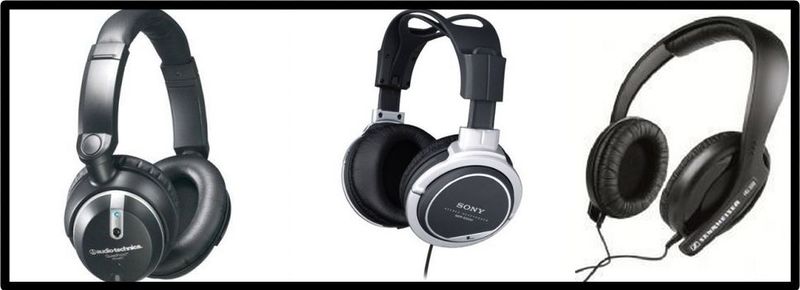
    I am pretty happy with my Sennheiser HD202 headphones that I use at work, my Sony MDR-XD-200 that I use at home, and my travel  audio-technica Quiet-Point ATA-ANC7.  

    I picked each one specific to issues I was trying to resolve where I use headphones.  The HD202 cover my ears very comfortably, but aren't so noise reducing that if someone knocked on my office door I would still hear them.  The MDR-XD-200 were 50% off, have excel sound quality, and are something you can wear for hours without much fatigue which is great for movies and audio editing.  The Quiet Points were cheaper than the Bose that I had before the were stolen, and fold up pretty well in thier protected case for travel.

    Even though I'm content, I find it very interesting to get other folks opinions, suggestions, recommendations, etc. on headphones.

    A recent This Week In Google (TWIG) [#234] recommended the following after discussing the recent ad during the Super Bowl for Beats:

    Leo also mentioned that Headroom was a good site with more info.  And the Home Theater Geeks podcast have several very detailed podcasts in their library about headphones.  If you want to get very technical on headphones (and even some ear buds) these podcasts are highly recommended.

    So … do you have a favorite headphone? And why?


    + , , , , , , , , , ,
  • Fujitsu-scansnap-s510mThe short answer is "Yes."

    I was able to get a S510M that is marketed towards to Apple Mac users to work on Windows 7 by loading the latest ScanSnap software for Fujitsu for the S510.  Once loaded and patched to the latest version, hook up via USB to the Windows 7 computer.

    When I did this I got an error that no driver was available, but I went to Computer > Manage > System Tools > Device Manager and right mouse clicked on the Unknown device for the scanner. Choose Properties and then the Driver tab.  Click Update Driver … and then manually select the Fujitsu S510 driver to apply to this device.  You should get a warning message saying it might not work but say OK.

    Once that drive was applied to the Device the S510M (with S510 driver) showed up in the Imaging device area and scanning worked without any issues.

    + , , , ,
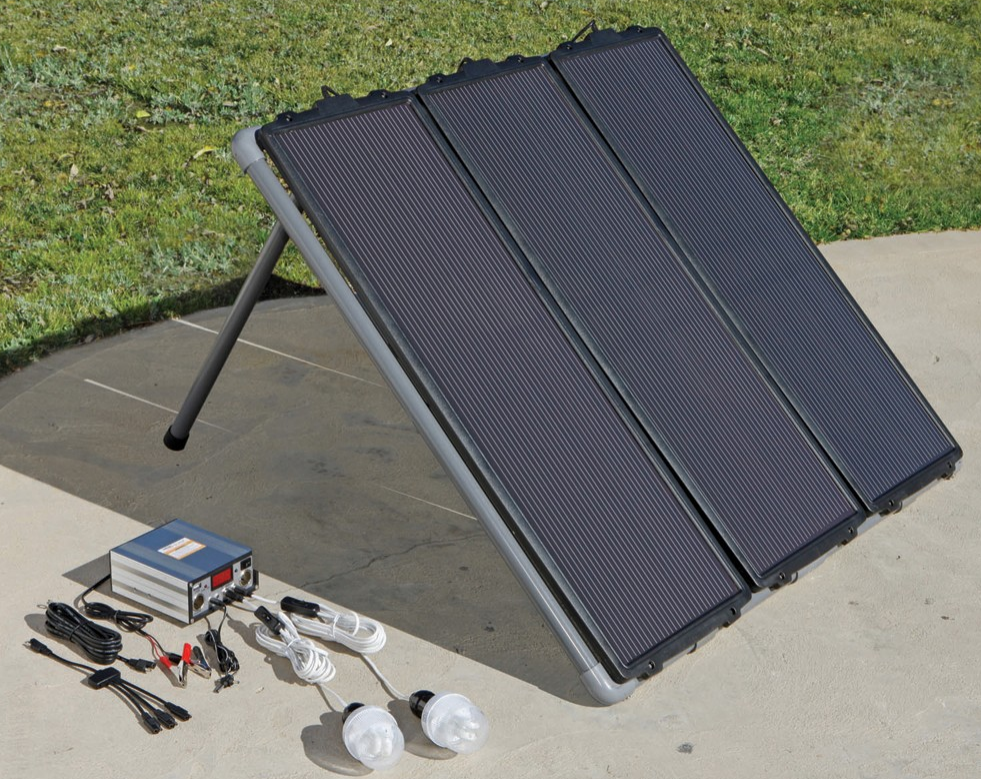
  • I recently picked up from Harbor Freight Tools the following solar power kit: 45W Solar Power Kit (#68751) for just over $150 (including tax).

    Solar-kit

    Over the course of the last couple of months I've been able to try out the kit on several camping trips were there was no easy electrical grid access.  The camping environment was pretty sunny but not always 100% full sun.  The time of year for all the trips was summer and the location was Southern California.  I ended up setting up the kit on the top of our small camper.

    The main reason I picked up the kit was to keep all of my tech gear charged so I could keep tabs on email, news, and any tech issue with my sites.  This was usually less than 1 hour a day which worked out well for my needs, and expectations related to being on a camping trip.

    The gear I was able to keep operational using the kit included: cell phone, tablet, WIFI card, and a laptop during trips lasting up to 7 days.

    I was suprised during the main daylight hours that the inverter could charge directly: the cell phone, tablet, and WIFI card.  To keep my laptop charged I needed to capture to an emergency car battery system, and then use 3rd party car charger/inverter to get the right power levels to keep the laptop charged.  I was also able to keep charged a USB battery pack so I could run my WIFI card during non-daylight hours when needed.

    One other lesson learned, was to turn off all electronics while sleeping.  This helped keep all the devices more readily available the next day then keeping them in standby/sleep mode overnight.

    All in all the system worked very well and I'd recommend it.

    Updated: 3/16/2014

    + , , , , , , , ,
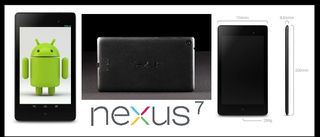
  • I have decided to upgrade my Google Nexus 7 (2012) to the new version (2013) that was released at the end of July 2013.  Here is a link to my previous review of the 2012 version.

    Nexus_7_2013_Blog_Post_Diagram

    The main reasons I think this new version (2013) in the base model configuration (WIFI only with 16-GBs)  is a big improvement over the last base model version (2012):

    • Form factor: the width is less so it is easier to hold in one hand
    • Upgraded internal specs (processor, sensors, etc)
    • Front and back facing cameras
    • Improved speakers
    • Improved screen
    • Also comes with Android v4.3 (the 2012 edition is also supported)

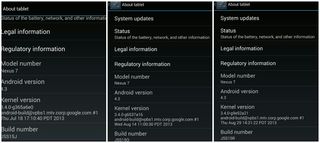
    That being said, one of the reasons that it took me more than six weeks (I'm writing this on 9/2/2013) to feel comfortable recommending this version was that the GPS interface had a bad hardware bug that made it pretty much useless for navigation.  Since this is a critical feature for me I wanted to make sure there was a fix (released late in August) that addressed the problem. The fixes to v4.3 list below from Google did solve my issues.  These fixes were also suppose to fix some touch screen issues but I never had those.

    2013-11-24 22.07.05

    One of the reasons that I decided to not get the 1st generation of the Apple iPad Mini (released in November 2012) and try out the Google Nexus 7 (2012) was mostly: form factor (pretty wide to hold in one hand), cost ($299), no integrated GPS on the WIFI model, and non-Retina display. Plus I was able to get my Nexus 7 (2012) for $150 used via Craigslist (see review).

    The one thing that I'm still not 100% happy about is that the camera on the back for "standard pictures" (5-MB) is not that great except in ideal lighting situations.  But that is pretty much my only complaint.

    So, with all things considered, I do recommend the Google Nexus 7 (2013) tablet if you are in the market for a 7" tablet.  I use it everyday effectively for: email; personal productivity; social media; consuming media (news, podcasts, blogs, RSS, video, etc); navigation; games; and tracking stuff (notes, references, health, etc). 

    UPDATE (11/24/2013): Now that there is a 2nd generation Apple iPad Mini with Retina display I did consider purchasing it, but decided that since I use the GPS everyday for navigation that I'm staying with the Google Nexus 7 (2013).  Plus the price difference is something to consider.  There are rumors that the 2013 edition will get a new list price of $199 which will mean there is a $100 price difference.

    + , , , , , ,
  • Defcon-21-badge+stuffDEFCON 21 was in Las Vegas, NV from August 02-04, 2013 and we were there.  Our real-time posts, references, and links are available over on @Technewsradio on Twitter.  

    We have a detailed report (PDF) from the sessions attended if you are interested.  Just drop us an email to get the full report or a request via message on Twitter.  A podcast summary is planned but not promised at this time.

    Things that we are "worried about" from an Enterprise computing perspective:

    • Social Engineering against users is like a hot knife cutting butter. Only defense seems to be training and awareness. Traditional information assurance (IA) protections: virus scanning, IDS, firewall, etc are not effective.
    • You can't secure what you don't manage.
    • Basic system administration tools and infrastructure services in the Microsoft Windows world can be used for evil: PowerShell, .NET, DNS, browsers, PKI, and SCOM.
    • USB is not your friend.
    • Mobile computing and Bring Your Own Device (BYOD) are really not your friend.
    • Cloud computing could be your friend but probably won't.
    • Developers writing code for an organization without a security focus is just asking for trouble.
    • If you think your stuff is secure just because you have it behind a lock and a key you are in denial.
    • In a year or less, penetration testing is going to include inexpensive mobile assault options via semi-autonomous very-small drones and robots.

    P.S. x 1: We were also at DEFCON 20 and have that report available if you are interested. Just drop us an email or message on Twitter for a link.

    P.S. x 2: There are also DEFCON 18 and DEFCON 19 reports.  They are surprisingly still relevant IMHO — same bat channel.

    + , , , , , ,