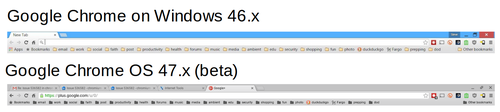
• I noticed this morning when my Chromebook upgraded to the latest version 47.x (Beta) that the Folder icons at the top (in my bookmarks bar) are all dark gray:

    ComparingFolderGUIChanges

    In my Chrome browser on Windows running the latest version 46.x the folders are "yellow-ish."

    I am sure there are other changes planned but this one really stood out.  I'm sure I'll get use it in a day or so.

    + , , ,
  •   Podcasts-listened-to-in-2006

    Below is my list of iPodder (now Juice) podcast feeds from October 2006 that I use to listen to on an iRiver:

    1. – ChuckChat Technorama –
    2. 43 Folders
    3. Alternative Classix – The Blog
    4. altNPR Groove Salad — Taste of the Week
    5. APMs Future Tense
    6. AttentionTech
    7. Behind the Mic
    8. BusinessWeek – The Cutting Edge
    9. Career Opportunities The High-Tech Career Handbook
    10. CBS Fall Premiere Interviews with Dana Greenlee
    11. Celtic Music News Celtic Music News
    12. Christ Lutheran Church Messages
    13. CIO Podcast
    14. Coverville
    15. Dan Bricklins Software Licensing Podcast
    16. DARN PC
    17. Digital Experience Podcast – MP3 Feed
    18. Distributing the Future
    19. Docs Podblog
    20. Endurance Radio Audio Interviews
    21. Engadget Podcasts
    22. Eric Mack On-Line
    23. Eurythmics – The Ultimate Collection
    24. Evil Genius Chronicles
    25. Friends in Tech
    26. Gillmor Gang
    27. Home Network and Computer Help – HomeNetworkHelpInfo
    28. In the Trenches
    29. IndieFeed ElectronicaDance
    30. Internet Pro Radio icannBlog
    31. Jazz Music – RedJazz Radio
    32. Jimmy Jett
    33. Jons Radio
    34. KFI Tech Guy
    35. Killer Innovations
    36. Lessig Blog
    37. MacCast – For Mac Geeks, by Mac Geeks
    38. MAKE Magazine
    39. Manager Tools
    40. MobileTechRoundup
    41. Morning Coffee Notes
    42. Music4iPodscom – ElectronicaDJ
    43. Network World Radio
    44. Old Wave Radio New 80s Music!
    45. On The Media from NPRWNYC
    46. OnTheRun with Tablet PCs Podcast
    47. OpenPodcastorg
    48. Ottmar Lieberts Listening Lounge
    49. PaulDotCom Security Weekly
    50. podbat podbat podcasts
    51. Podcast Brothers
    52. Pritzker Military Library Podcasts
    53. Radio Leo
    54. Reel Reviews Radio
    55. Rip & Read Blogger Podcast
    56. Slashdot Review
    57. State Dept – Daily Press Briefings
    58. Steve Holden Tech Rag Tear Outs (TRTO)
    59. Steve Holdens Weblog
    60. Tech News Radio
    61. TechPodcastscom Network
    62. Terry Storch
    63. TGN Behind the Scenes
    64. TGN The Living Word
    65. The Bag and Baggage Podcast [now This Week in Law]
    66. The Bitterest Pill
    67. the Eric Rice Show
    68. The Golden Hammer Tech Watch
    69. The Invisible Hand
    70. The Invisible Hand, Enhanced Version
    71. The Pentagon Channel
    72. The Roadhouse
    73. The Rock and Roll Geek Show
    74. ThePodcastNetwork The Gadget Show
    75. ThePodcastNetwork The Mobiles Show
    76. ThePodcastNetwork The TabletPC Show
    77. ThePoint
    78. These Days [@KPBS]
    79. They Might Be Giants Podcast
    80. this WEEK in TECH
    81. todbitscom
    82. Typical PC User Podcast
    83. Ultima Thule Ambient Music Radio
    84. Valid Syntax
    85. vinyl podcast
    86. Voices in Your Head wDave Slusher
    87. WGBH Morning Stories
    88. Wi-Fi Networking News Podcasts
    89. Wizbang Podcast

    I found this while recovering my old iBook backup drive using SpinRite.  I was actually trying to find some older TechNewsRadio podcasts that were posted on a server that no long exists.  I seem to have a gap of ~200 with bad links.

    + , , , , , ,
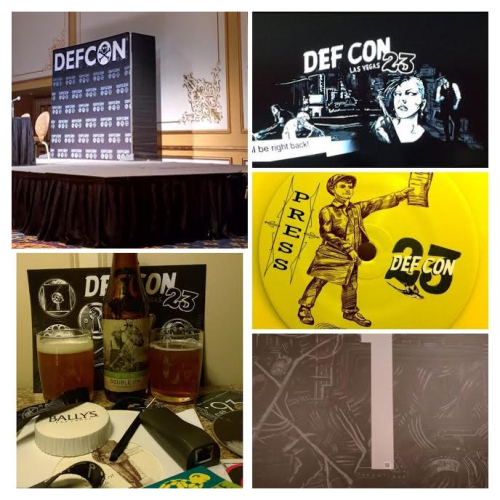
  • DEFCON-23Here are my DEF CON notes from the sessions that I attended and the presentation material that was shared:

    In addition my previous notes (all in PDF) are available for 22 (2014), 21 (2013), 20 (2012), 19 (2011), & 18 (2010).  I wish I started going to DEF CON sooner but it is what it is.

    Feel free to do what you want with the report – "I attend sessions so you don't have to." 😉

    I plan on attending DEF CON 24.  Follow along real-time on Twitter @technewsradio.

    UPDATE (8/3/2016): If you are a Chvrches fan and want to be interviewed in person at DEF CON 24 then message me on Twitter @chvrchespodcast.

    + , , ,
  • Acer-cromebook3picts
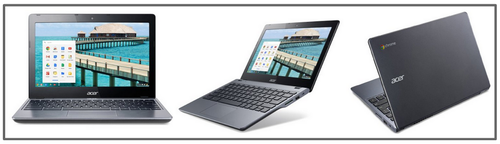
    Last summer (2014) I picked up a Asus C720-2802 Chromebook and posted a review on TechNewsRadio.com.

    I recently updated to a newer version (same form factor) — the Acer C720-3605.  I had originally ordered the Acer C720-3404  (which is the Canadian version), but ended up with the U.S. version: C720-3605.  They appear at least on the specification pages on Acer to be exactly the same other than model number (PDF spec analysis). I might have missed something so if there is a difference then please let me know.

    The main reasons for upgrading:

    1. Improved Performance (faster processor with dual-core)
    2. Additional RAM (4-GB vs. 2-GBs)
    3. Better HDMI output (for hooking up to a large monitor @ my home desk).
    4. More Local Storage (32-GBs vs. 16-GBs — excellent for watching more digital content)
    5. Needed a another computer @home for my daughter to use

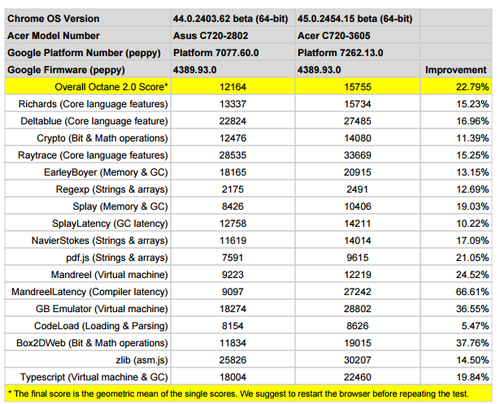
    Here are some stats using Octane 2.0 test:

    OctaneTestBetween2AcerModels

    While I wasn't having any real performance issues with the 2802-series, I've found that I can experience the difference in browsing and streaming media with the 3605-series.  The hardware updates are definitely an improvement in real world usage from my perspective.

    All-in-all I have been very happy with Chrome OS and these two Chromebooks (the old one is now my daughter's main system).  For me the key selling points: great battery (more than 8 hours); excellent small form factor; responsive & comfortable keyboard; integration with Google services; and the simple OS updates & patches.

    I look forward to using it again as my main note taking system for DEFCON 23.

     You can order your own via this Amazon Acer C720-3605 link or this Amazon Acer C720-3404 link.  Prices seem to be all over the board so make sure you are comfortable with ordering the right model number at the right price.

    + , , ,
  • IMG_20150529_104124-COLLAGE

    On Friday, May 29th Carson and I went on a day trip up to Valencia, CA to ride roller coasters at Six Flags Magic Mountain.

    Here are the rides we went on and they are prioritize with our favorites (high to low):

    1. Scream: Smooth, fun, easy to see where you are going, 
    2. Batman: Smooth, fun, easy to see where you are going.
    3. Twisted Colossus (new!): Very fast, long, not as easy to see where you are going, intense
    4. Gold Rusher: very simple, classic easy style
    5. Ninja: a lot like Batman but not as intense
    6. Viper: Very fast, bumpy for Carson
    7. Orient Express: slow and clam
    8. Grand Carousel: great way to end the day [only horses though 😦 ]
    9. X2: Way to scary
    10. Full Throttle: huge loop; slow at top (feels like falling – yuck!), plus one "trick" that we won't tell you about but we did not like it
    11. Apocalypse: Very jerky, long wait

    Basically we both agreed that we like smooth and easy to see where we are going roller coasters.  We don't like: feeling like we are falling, bumpy, and going backwards.

    All in all we really liked the majority of rides and look forward to going back sometime in the future.

    + , , , ,
  • I am not an expert in photography but here is a tip that has been useful for me.  

    When I get a picture that has some sort of issue like to much light or not completely in focus, I do a conversion to black and white (B&W) to see what I get.

    Here is a recent example (using Picasa 3 on Windows) that looks pretty good to me:

    Carson's Birthday Party

    Do you have any other suggestions for situations like this?

    + , , , ,
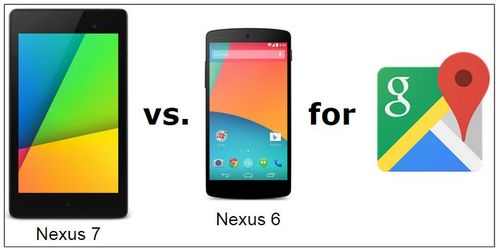
  • Nexus7vsNexus6-for-gps-google-maps

    I think I've found a good reason to keep my Nexus 7 (2013) as my daily GPS unit in my car compared to my new Nexus 6.

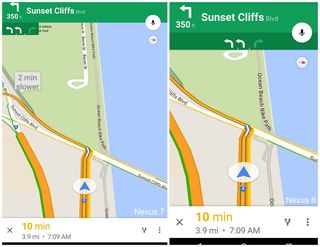
    Here is a Screen Shot #1 comparison (click on image for bigger resolution):

    Google Maps

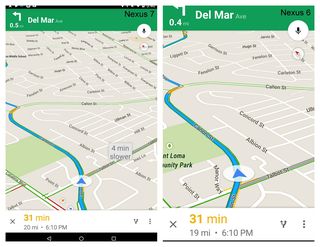
    And here is Screen Shot #2 comparison (click on image for bigger resolution):

    Google Maps1

    It appears that since the Nexus 7 (left images) is a tablet and has more screen real estate then the smartphone Nexus 6 (right images) you get the alternative route time notifications as you are driving your selected route in Google Maps.

    These notifications are actually a great feature, and I use it all the time for making real time route changes.

    If anyone knows if there is actually a way to enable this on the Nexus 6 then please let me know.  

    NOTE: I did load up Waze on the Nexus 6 to see if that application had the route time notifications but from what I could tell it doesn't.

    + , , , , ,
  • Keyboard

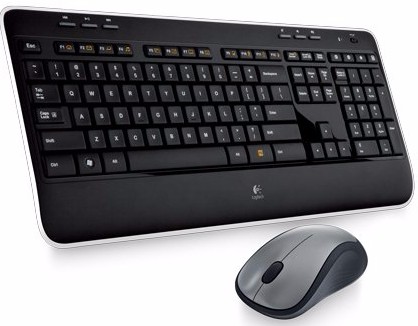
    I recently picked up a Logitech Wireless Combo Mk520 With Keyboard and Mouse to use full time with my Acer Chromebook when I'm using it in desktop computer mode.  

    When I am in this mode I usually use the setup with a SAMSUNG T24C550 monitor as the primary monitor and the Acer's laptop monitor as my 2nd monitor off to the right-hand side.

    I like this setup because it enables wireless access to both the keyboard and the mouse using one USB port.  Previously I had a dedicated wireless mouse and then a bluetooth keyboard. However the bluetooth keyboard wasn't completely full-size, would periodically drop off connectivity, and was better suited to short-term typing like like periodic emails responses on my Nexus 7.

    The only draw back with the Mk520 is that the Function (F) keys are not ideally setup to match the icons on them.

    The keyboard uses the basic standard keyboard layout on most Chromebooks. So ESC is ESC (Escape) and:

    • F1: Go to the previous page in your browser history
    • F2: Go to the next page in your browser history
    • F3: Reload your current page.
    • F4: Open your page in full-screen mode
    • F5: Switch to your next window
    • F6: Decrease screen brightness
    • F7: Increase screen brightness
    • F8: Mute
    • F9: Decrease system volume
    • F10: Increase system volume

    At the very top of the keyboard is a media control area (3 keys): back, play/stop, forward. Those don't seem to work with videos.  But the sound control area (3 keys): mute, decrease sound, and increase sound do work.  And the WINDOWS button is a dedicated SEARCH button; the STAR button brings up the BOOKMARKS page list; and the CALCULATOR button goes into FULL SCREEN MODE.

    Over all the keyboard feel when typing is very good, and I like the pressure the keys have. In addition, I like the ability to tilt up the keyboard and to have it stand-up at 90-degrees for using your desk area for writing if needed.  I would recommend the keyboard if someone is looking for the same feature set.


    + , , , ,
  • PCI-guidance

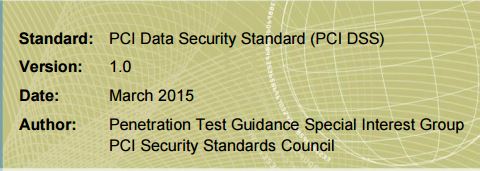
    The PCI Security Standards Council has released guidance (PDF) to businesses to show them how to use penetration testing to identify network vulnerabilities that could be exploited for malicious activity. [tbusinessnet.combankinfosecurity.com, news.google.com]

    There is also a discussion thread over on SANS.org Forums.

    + , ,
  • Security-info-graphic

    The CISSP Domains (Effective April 15, 2015) will be changing:

    1. Security and Risk Management (Security, Risk, Compliance, Law, Regulations, Business Continuity)
    2. Asset Security (Protecting Security of Assets)
    3. Security Engineering (Engineering and Management of Security)
    4. Communications and Network Security (Designing and Protecting Network Security)
    5. Identity and Access Management (Controlling Access and Managing Identity)
    6. Security Assessment and Testing (Designing, Performing, and Analyzing Security Testing)
    7. Security Operations (Foundational Concepts, Investigations, Incident Management, Disaster Recovery)
    8. Software Development Security (Understanding, Applying, and Enforcing Software Security) 
    + , ,