• EDITED on 8/2/2014

    The most current podcast has been released Tech News Radio #373

    The following are items currently in the queue for being included in a future podcast (no ETA):

    The following are currently items of interest but probably not something we will cover in the next podcast (they propobably will be posted on @technewsradio):

    • The 'new' eXploit magazine is devoted to learning about and examining exploits.  The first edition is focused on: Metasploit, PMI, WSDL, SOAP, DoS
    • Wickr is a secure communications app for Apple iOS that has no central repository of msgs & includes a msg self-destruct option
    • Path is a "social network" that limits your social circle to no more than 150 people (aka Dunbar's number)
    • Pair is an mobile application that only allows for communication between just two people
    + ,
  • Currently making preparations for putting out a new podcast. As we work on the production, we will update this blog post with the latest info.

    The main focus: review of John Lloyd Young's (JLY) return to Broadway; updates on news (remember the best place is the Jersey Boys Blog); a cast member "vault" interview from a Jersey Boys Las Vegas visit; and a bunch of music samples (including a medley from JLY new album & "Stay").

    Current Jersey Boys news:

    Current Four Seasons news:

    Midtown Men news:

    JLY Medley @ end of the podcast (suggestions):

    • From Linda: Hold Me, Thrill Me, Kiss Me; Since I Fell for You; & Hey There, Lonely Girl
    • From Carolyn: Hold Me, Thrill Me, Kiss Me; Since I Fell for You; & Hey There, Lonely Girl
    • Buy the new album on iTunes


  • CNET's Seth Rosenblatt (@b1g1nj4p4n) has a good pointer to a new eight-rotor Hexcopter that would be ideal for building out a DIY photo survelliance platform.  The new unit was demoed at DEFCON 2012.


    +
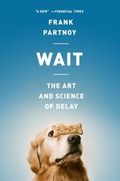
  • Wait Book Cover Image After hearing a recent news blurb from The Economist on a new book called "Wait" by Frank Parntnoy I put this book in my queue.

    I just finished reading the book — well to be completelly honest, I listened to it via my Audible.com subscription — and here is my review.

    I found the book very interesting and a good balance between some of the "physical" and "mental" reasons for how we make decisions, and why waiting before making a decision is a valid decision making process.

    The book moves through examples of "waiting" from a series of perspectives that drive home the point that waiting is a natural course of activity and something that should be a valid alternative to snap decisions and first-imrpessions.

    Here is a list of highlevel topic areas where waiting is analyzed:

    • Relationships (Baby to Parent, Dating, etc)
    • Financial (Lehman Brother's collapse, )
    • Athletics (Football, tennis, baseball, cricket , )
    • Humor (Commedian's and their punch lines)
    • Fast Food (just seeing a logo can speed you up)
    • Military (OODA loop)
    • Politicans (and the art of the apology)

    In addition, one of the main themes of the book is that "managing delay", which we called today "procastination," is actually something we really need to cultivate more or we will continue to have growing problems with time-based decision making.

    In summary, according to Professor Partnoy the best decision makers are those that can gauge how much time they have to react, and then wait the longest possible amount of time before making/executing on a decision.

    + , , , ,
  • One of the reasons I've always liked using an Apple Macintosh is AppleScript.  I know there is PowerShell on Windows but I don't find it as easy to just solve a problem as seamlessly with AppleScript.  

    Here is an example …

    I have been subscribed to an email feed from DefenseLink that gives you pictures taken by DOD photographers.  However, the links get messed up (BLOCKED) by the anti-malware software on the mail servers at work.

    So I take the messed up URLs and save them to a text file.   Then I run this script when I want to review the pictures:

    property myURL : ""

    tell application "TextWrangler"

    activate

    select line 1 of window 1

    set myURL to contents of selection

    delete line 1 of window 1

    end tell

    tell application "Google Chrome"

    activate

    set myTab to make new tab at end of tabs of window 1

    set URL of myTab to myURL

    end tell

    Pretty easy.  Meets my needs. Solves a problem.  Good deal.

    + , , ,
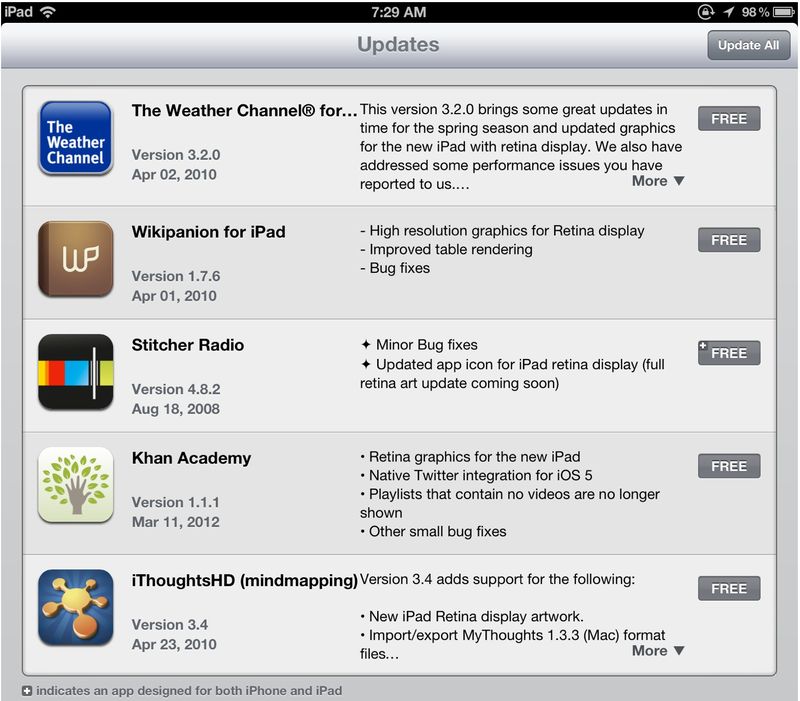
  • As a "new" iPad owner, one of issues outlined as a possible negative impact of having a Retina display was that application memory storage was going to be much bigger.  Since my plan was to move from iPad 2 with 16-GB to the new iPad with 16-GB, I was a little concerned since I seemed to have between 500-MBs to 1-GB free.

    So, after a couple of recent updates where I noticed "Retina display' updates listed in the new feature list, I decided to try and track file sizes as updates were happening.  Here is the first sample of applications updated:
    Recent-ipad-updates

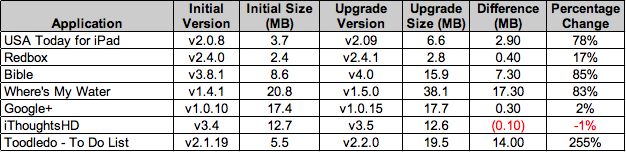
    And this is the summary of increases for these apps:

    • Stitcher v4.8.1 (13.9-MB) went to v4.8.2 (14.1-MB)
    • Wikipanion v1.7.5.4 (2.5-MB) went v1.7.6 (4.9-MB)
    • Khan Academy v1.01 (1.8-MB) went to v1.1.1 (1.9-MB)
    • iThoughtsHD v3.3 (7.1-MB) went to v3.4 (12.7-MB) 
    • The Weather Channel (TWC ) v2.3.2 (8.2-MB) went to v3.2.0 (97.7-MB) 

    1st-ipad-app-analysis

    My second sampling included (less than a week ago):

    Ipad-app2-update

    With the following analysis:

    2nd-ipad-app-analysis

    So, it does appears that in general 'new' iPad applications are larger, and based on my sampling it looks like about 1.5x larger on average.  Most of the applications I tracked are all new Retina-savvy applications, but they also have other upgraded capabilities, new features, fixes, etc.  As the saying goes "correlation does not mean causation."

    It was interesting that the iThoughtsHD most recent update went down in size (but did increase when it added "Retina display" feature).  Also the Google+ application is not Retina-savvy  per the application notes but it did have a small increase between versions.

    The impact to my own iPad seems relatively minor since I seem to have between one to two GBs free (mostly changing based on music or video uploads) since moving from iPad 2 to new iPad.  I'll keep monitoring and will do an update post if something significant turns up.

    Thoughts?!?
     

    + , , , , , ,
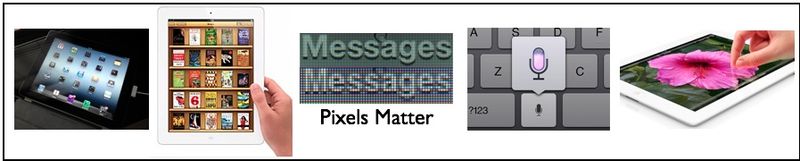
  • There are a lot of reviews on the new 3rd generation iPad.  Here are some of my thoughts after 48+ hours of use:

    • The screen is amazing. The Retina-display is probably worth the upgrade all on its own. One thing that is very noticeable is that iPhone 2x applications are much clearer and crisp than on the iPad 2. 
    • The dictation software with iOS 5.1 for iPad is surprisingly good. I have used it a bunch of times vice typing for both emails and web searches.  It has been 99% accurate for me.
    • The camera is a great upgrade from the iPad 2.  I used the camera a lot with the iPad 2 and was pretty disappointed with the quality.  This was one area that I wanted to see some improvement in.  I'm pretty happy with the ~20 pictures I've taken so far (inside & outside).  I do need to play more with it, but for now I'm very satisfied.

    New_ipad

    A couple of other things to mention:

    • Upgrading from the iPad 2 to the new iPad was pretty successful.  One issue I've had pretty consistently is that you do need to delete all network settings after an upgrade to get the iPad to work consistently on my Wi-Fi network.  I had this problem going from the original iPad to the iPad 2 last year, and again this year when I upgraded my son's iPad to my old iPad 2.
    • It is also kinda interesting that some applications move over with no new user/password logon issues but then others require re-entry of user name/password.  I guess re-entry is probably better from a security perspective, but it does slow you down if you are using a bunch of complex passwords like I am across many different services/applications.

    Bottom line: As someone who has used the original iPad (16-GB, Wi-Fi) , and then the iPad 2 (16-GB, Wi-Fi), I definitely think that the new iPad (16-GB, Wi-Fi) is an excellent upgrade for me. I'm very happy with the purchase. 

    + , ,
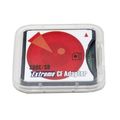
  • I recently purchased a Compact Flash (CF) adapter that holds an SD card.  The one I got was: SD-CF II: SD to CF Type II Adapter (Supports SDHC MMC) from Amazon for under $20.

    Extreme-CF-adapterThe reason I got this was to reduce some drag that was holding me back from taking my camera when I went out over the last couple of months.  Before the adapter, I had a standard CF Type II card that worked great, but I had created a work flow issue when I moved to my current workspace location at home.

    Moving to the new space gave me an opportunity to set up my computer with no USB hub, card readers, etc. (ie. much cleaner and less cluttered).  However, now to get pictures off the camera I had to get out the adapter and hook up several USB cables.  Ugh.

    But then I realized my main system has a built-in SD card slot so the adapter streamlines getting the pictures to my computer.  Pop the card out of the camera, take out the SD card, and then put it in my computer for upload.  Simple.  Less drag.

    Here is a picture (also on Flickr in a larger format) that I wouldn't have taken without this tweak: 

    Cactus

    Anyone else have any other tweaks or gear recommendations that have reduced drags in their systems?  Let me know if you do!

    + , , , , , ,
  • Church

    Our church – Christ Lutheran La Mesa (7929 La Mesa Blvd., La Mesa, CA 91942) – is having three Christmas Eve services in 2012:

    • Saturday, December 24 – Family Christmas Worship with Children's Message at 3:30 p.m. in the Church Sanctuary. This service is designed for young families and incorporates traditional Christmas carols that are family friendly to sing as well as a special children's message geared for our kids, led by Cheri. Childcare is available in the nursery.
    • Saturday, December 24 – Christmas Worship with Communion at 5:30 p.m. in the Church Sanctuary. This service features the celebration of Holy Communion as we celebrate Christ's birth. Join us afterwards for hot cider and cookies on the patio. Childcare is available in the nursery.
    • Saturday, December 24 – Candlelight Worship at 7:30 p.m. in the Church Sanctuary. This service features our choir as well as our traditional "candlelight ending" as we sing together the great carols of Christmas for those passing by on La Mesa Boulevard. As we conclude, we will have the opportunity for hot cider and cookies on the patio.

    There will also be a service on Christmas morning:

    • Sunday, December 25 – Christmas Day Communion Worship at 10 a.m. in the Church Sanctuary. As we celebrate the birth of Christ, we celebrate the gift of His Supper, receiving the body and the blood of Christ for the forgiveness of our sins. The message is from John 1, the Christmas Day Gospel reading, and speaks of God among Us which the Christ Child brings as He moves into our hearts and lives.
  • For a while I've been doing a little bit of ambient information testing DIY style by loading up webpages that I want to see information from and then automatically moving through the tabs after ~20 seconds.  

    These sites are loaded on an external display and then running in the "ambient" background most of the day.  I have been accomplishing this using Firefox and an add-on called Tab Slideshow.

    Ambient-device-displays

    Ambient information displays and displaying information in a meaningful way seems to be a growing area of interest within new products and computer science research circles.  The new version of Windows 8 is going to have some of these features that Microsoft has already brought to Windows Phone.  

    There is also a company called Ambient Devices making alarm clock size devices that show you what you want in a very customizable way.  Another major player in this market is chumby with a complete line of options including support for Android.

    Today, I was wonder what options were available for replicating this DIY browser approach with Google Chrome. In Firefox, I've been using the feature Full Screen after launching Tab Slideshow. There is a similar feature called Enter Presentation Mode in Chrome which seems to do a better job IMHO of getting more of the computer out of the display.  

    To get the tabs you want to autmoatically cycle through there appears to be three plugins to check out for Chrome:

    I think I'm going to start with Resolver – Tabs and see how it works.  Anyone have any other suggestions?!?


    + , , ,