What Gear Do You Need For A Podcast?

I am doing my podcasts very simply.  That may be good for me (pretty cheap) but bad for my listeners if my audio output isn’t that good (I actually think it is AOK, but I know squat about audio really). 

My primary setup is basically a Plantronics DSP-100 Digital USB microphone for getting my audio voice in, and Audacity for Windows for capture, editing, and output (I am beta testing MixCastLive).  This all done on a custom designed Windows XP SP2 system at home.

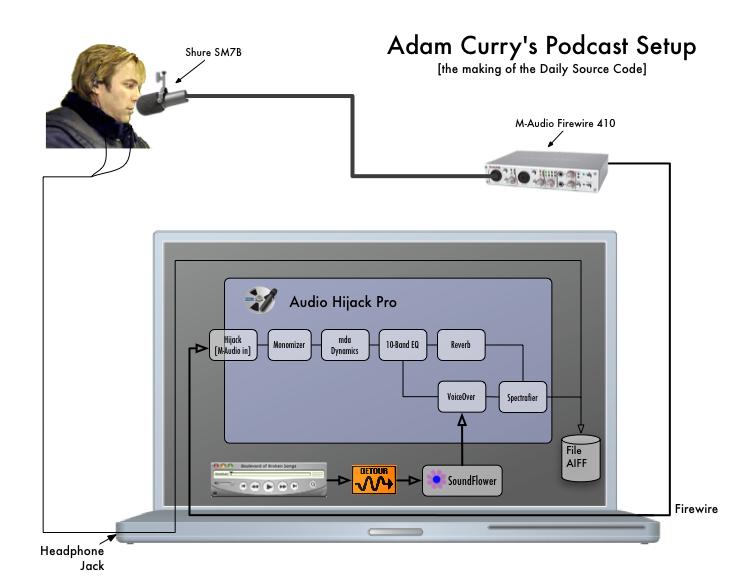
Others are doing some significantly cooler audio engineering work:

Also check out the excellent sites: howtopodcast.org & Behind The Scenes for good "how to do podcasts … from recording to posting."

UPDATE: Jake Ludington on recording and publishing are good new references. And Eric Mack has pictures and details on his "mobile setup."

+

51 responses to “What Gear Do You Need For A Podcast?”

  1. Hey Steve, there are four things that can drastically improve any podcast setup, regardless of how good the equipment is:
    1. Make sure you record in a space that has as little background noise and as few echos as possible. Some people have suggested recording in a closet. It’s not that bad of a suggestion!
    2. Use proper mic positioning and technique. The most important tips: Don’t talk directly into the mic unless you have a pop filter (a screen that goes between your mouth and the mic…you can use stretched pantyhose if you’re on a budge). Stay close to the mic, usually within 4-6 inches. Try positioning the mic above, below, and to the side of your mouth (always pointing the mic at your mouth) to see which gives the best sound. Don’t hold the mic or touch it while you’re talking. Once you find the best mic position, try to maintain that position while you’re taking without shifting around (mics are usually very sensitive to distance).
    Here are a few sites with additional helpful information on micing:
    http://artistpro.com/index.php?module=PnCourses&func=getPage&course_id=24&page_id=151
    http://emusician.com/special_report/adobe4/
    3. Watch your levels. Somewhere in your recording software or your preamp (if you’re using one) there is a level indicator. You want to make sure that you keep it as close to the red (or 0db) as possible without going into it. If you need to speak loudly to make a point then move away from the mic slightly. If you need to speak quietly then move in. As a rule, you’re better off with your levels a little too low than a little too high. (Too low will add some noise into the mix. Too high will clip your sound and sound like you have blown speakers.)
    4. Use a compressor. You can use a hardware compressor between the mic and the computer or you can use a software plugin in your editing software if it supports it (Audacity does). There are plenty of free compressor plugins available. A compressor simply brings the the soft and loud sections of your recording closer together (but it won’t fix problems with levels being too high).
    Follow these four tips and you’ll be surprised at how good you can get your budget mic to sound!
    Craig Patchett
    craig@godcast.org
    The GodCast Network

    Like

  2. Good topics. Thanks a lot for your nice post. I am so happy to see this things….
    PING:
    TITLE: How Other’s Podcast
    BLOG NAME: Phil Windley’s Technometria
    Steve Holden catalogues the technology and techniques that a dozen or so sites use to create their podcasts. I wrote up my own podcasting HOWTO a while back….
    PING:
    TITLE: How Other’s Podcast
    BLOG NAME: Phil Windley’s Technometria
    Steve Holden catalogues the technology and techniques that a dozen or so sites use to create their podcasts. I wrote up my own podcasting HOWTO a while back….
    PING:
    TITLE: Steve points to me
    BLOG NAME: Adrian’s Curatorship
    It looks like Steve Holden has a link going to my podcast setup… how cool is that?!? I figured nobody would link to it, and when I check technorati tonight, there it was…
    Sweet!…
    PING:
    TITLE: Big Rigs and Other Cool Stuff
    BLOG NAME: The GodCast Network: Behind the Scenes
    A new episode of “Behind the Scenes” looks at podcasting rigs, mic techniques, and more.
    PING:
    TITLE: Podcast Equipment Setups
    BLOG NAME: The GodCast Network: Behind the Scenes
    Steve Holden has published a useful list of web sites that discuss podcast setups.

    Like

  3. Hey Steve, there are four things that can drastically improve any podcast setup, regardless of how good the equipment is:
    1. Make sure you record in a space that has as little background noise and as few echos as possible. Some people have suggested recording in a closet. It’s not that bad of a suggestion!
    2. Use proper mic positioning and technique. The most important tips: Don’t talk directly into the mic unless you have a pop filter (a screen that goes between your mouth and the mic…you can use stretched pantyhose if you’re on a budge). Stay close to the mic, usually within 4-6 inches. Try positioning the mic above, below, and to the side of your mouth (always pointing the mic at your mouth) to see which gives the best sound. Don’t hold the mic or touch it while you’re talking. Once you find the best mic position, try to maintain that position while you’re taking without shifting around (mics are usually very sensitive to distance).
    Here are a few sites with additional helpful information on micing:
    http://artistpro.com/index.php?module=PnCourses&func=getPage&course_id=24&page_id=151
    http://emusician.com/special_report/adobe4/
    3. Watch your levels. Somewhere in your recording software or your preamp (if you’re using one) there is a level indicator. You want to make sure that you keep it as close to the red (or 0db) as possible without going into it. If you need to speak loudly to make a point then move away from the mic slightly. If you need to speak quietly then move in. As a rule, you’re better off with your levels a little too low than a little too high. (Too low will add some noise into the mix. Too high will clip your sound and sound like you have blown speakers.)
    4. Use a compressor. You can use a hardware compressor between the mic and the computer or you can use a software plugin in your editing software if it supports it (Audacity does). There are plenty of free compressor plugins available. A compressor simply brings the the soft and loud sections of your recording closer together (but it won’t fix problems with levels being too high).
    Follow these four tips and you’ll be surprised at how good you can get your budget mic to sound!
    Craig Patchett
    craig@godcast.org
    The GodCast Network

    Like

  4. Podcast Equipment Setups

    Steve Holden has published a useful list of web sites that discuss podcast setups.

    Like

  5. Big Rigs and Other Cool Stuff

    A new episode of “Behind the Scenes” looks at podcasting rigs, mic techniques, and more.

    Like

  6. Steve points to me

    It looks like Steve Holden has a link going to my podcast setup… how cool is that?!? I figured nobody would link to it, and when I check technorati tonight, there it was…
    Sweet!…

    Like

  7. How Other’s Podcast

    Steve Holden catalogues the technology and techniques that a dozen or so sites use to create their podcasts. I wrote up my own podcasting HOWTO a while back….

    Like

  8. How Other’s Podcast

    Steve Holden catalogues the technology and techniques that a dozen or so sites use to create their podcasts. I wrote up my own podcasting HOWTO a while back….

    Like

  9. Do you have a list of the best equipment?

    Like

  10. Do you have a list of the best equipment?

    Like

  11. In scoping out the equipment needed to podcast with two microphones, it seems like it would be best to go with two Shure microphones and a mixer. Is that correct? And I guess two sets of headphones?

    Like

  12. In scoping out the equipment needed to podcast with two microphones, it seems like it would be best to go with two Shure microphones and a mixer. Is that correct? And I guess two sets of headphones?

    Like

  13. Jill … at a basic level if you are trying to record a conversation by two people sitting in the same room what you describe is probably sufficient to get started. There may be some more research to be done on the microphones depending on your budget and you should look at the mixer recommendations over at (http://podcastrigs.com/). Once you have the gear and you do your recording like to a open source applicaiton like Audacity, you should be able to output an MP3 that is easy to post. – Good luck! Steve (AztecMedia.net)
    P.S. I actually use two microphones in to my Marantz 660 recorder and then I do all post production on an iBook G4 using Audacity + a couple of other tools.

    Like

  14. Jill … at a basic level if you are trying to record a conversation by two people sitting in the same room what you describe is probably sufficient to get started. There may be some more research to be done on the microphones depending on your budget and you should look at the mixer recommendations over at (http://podcastrigs.com/). Once you have the gear and you do your recording like to a open source applicaiton like Audacity, you should be able to output an MP3 that is easy to post. – Good luck! Steve (AztecMedia.net)
    P.S. I actually use two microphones in to my Marantz 660 recorder and then I do all post production on an iBook G4 using Audacity + a couple of other tools.

    Like

  15. I will be doing podcasts very soon..
    and am very confused about the equipment needed to do the podcast via phone…

    Like

  16. I will be doing podcasts very soon..
    and am very confused about the equipment needed to do the podcast via phone…

    Like

  17. Hello! — Congrats on starting your podcasts.
    Phone recording is definitely a challenging topic.
    I use two approaches. One is I use SKYPE to record phone conversations, and second I actually use a phone splitter from radioshack to capture the audio directly from a telephone conversation.
    The first version is great if people are comfortable with technology. The second one works better for the technically challenged. The bad news about the second option is that the noise levels can be bad, so you’ll probably have to use a tool to post production noise reduction and leveling. I use Audacity and SoundSoap to do post production noise reduction. There is a great new tool called Levelator for doing sound leveling that I highly recommend.
    I hope this information makes sense.
    I do highly recommend the book Podcast Solutions … it covers this in detail (including a more high end solution called digital hybrids).
    Good luck! — Steve

    Like

  18. Hello! — Congrats on starting your podcasts.
    Phone recording is definitely a challenging topic.
    I use two approaches. One is I use SKYPE to record phone conversations, and second I actually use a phone splitter from radioshack to capture the audio directly from a telephone conversation.
    The first version is great if people are comfortable with technology. The second one works better for the technically challenged. The bad news about the second option is that the noise levels can be bad, so you’ll probably have to use a tool to post production noise reduction and leveling. I use Audacity and SoundSoap to do post production noise reduction. There is a great new tool called Levelator for doing sound leveling that I highly recommend.
    I hope this information makes sense.
    I do highly recommend the book Podcast Solutions … it covers this in detail (including a more high end solution called digital hybrids).
    Good luck! — Steve

    Like

  19. Hi Steve!
    Would you change/update any of your recommendations? I am basically looking to record voice audio (so I need equipment and software) that I could then put on our websites (i.e. reading excerpts from my book, or a short lecture). Thank you and great site!
    Darien

    Like

  20. Hi Steve!
    Would you change/update any of your recommendations? I am basically looking to record voice audio (so I need equipment and software) that I could then put on our websites (i.e. reading excerpts from my book, or a short lecture). Thank you and great site!
    Darien

    Like

  21. For getting started … you can not beat a USB microphone and Audacity (Mac, Windows, Linux). I have matured my basic setup to include a Samson C01 Microphone and Beringer Tube Ultragain MIC100 pre-amp recording into a Marantz 660 recorder. Mostly because I built a recording studio into one of my spare closets for better acoustics. – Steve

    Like

  22. For getting started … you can not beat a USB microphone and Audacity (Mac, Windows, Linux). I have matured my basic setup to include a Samson C01 Microphone and Beringer Tube Ultragain MIC100 pre-amp recording into a Marantz 660 recorder. Mostly because I built a recording studio into one of my spare closets for better acoustics. – Steve

    Like

  23. If i already have a behringer djx 700 mixer and 4 turntables connected to it i want to connect that mixer to the other mixer for the podcast is that possible

    Like

  24. If i already have a behringer djx 700 mixer and 4 turntables connected to it i want to connect that mixer to the other mixer for the podcast is that possible

    Like

  25. DJ Arsenic … You should be able to take the mix’d sound from your DJ mixer into your podcast mixer and then record to computer or other recording device. I am not sure why you need the second mixer. – Steve

    Like

  26. DJ Arsenic … You should be able to take the mix’d sound from your DJ mixer into your podcast mixer and then record to computer or other recording device. I am not sure why you need the second mixer. – Steve

    Like

  27. Amber Armstrong Avatar
    Amber Armstrong

    I want to hook up a phone to my Behringer podcasting equipment. What equipment do I need? I am lost, and don’t know where to start.
    Please email me back. I would really appreciate your advice.

    Like

  28. Amber Armstrong Avatar
    Amber Armstrong

    I want to hook up a phone to my Behringer podcasting equipment. What equipment do I need? I am lost, and don’t know where to start.
    Please email me back. I would really appreciate your advice.

    Like

  29. Hello! This is a little bit more complicated than a short blog answer allows but here is a try … there are two technologies you can look at: #1.) Digital Hybrid Phone Interface (like the Telos-1 … which is expensive but works great … I have one in my studio); or #2.) Add an extra computer to your setup and run the audio out from a Skype (or other VoIP system that allows for phone calls in/out) into your podcast gear.
    I’d recommend you consider either book: Podcasting for Dummies or Podcast Solutions. Both describe ways of doing #1 and #2; and probably other ways.
    If you need more information let me know (sholden@aztecmedia.net) … my podcast consulting service.
    Good luck – Steve

    Like

  30. Hello! This is a little bit more complicated than a short blog answer allows but here is a try … there are two technologies you can look at: #1.) Digital Hybrid Phone Interface (like the Telos-1 … which is expensive but works great … I have one in my studio); or #2.) Add an extra computer to your setup and run the audio out from a Skype (or other VoIP system that allows for phone calls in/out) into your podcast gear.
    I’d recommend you consider either book: Podcasting for Dummies or Podcast Solutions. Both describe ways of doing #1 and #2; and probably other ways.
    If you need more information let me know (sholden@aztecmedia.net) … my podcast consulting service.
    Good luck – Steve

    Like

  31. Great post, thanks for sharing your idea in terms of podcasting. As a suggestion you have to come up many ways in improving your podcast set up. Here are some of my idea: First thing to do, Don’t use the built in microphone of your laptop computer, the reason for this is that although it might be of good quality it will pick up computer fan and hard drive noise. Second, record in the room with enough space and use a microphone with stand to avoid any noise. Third, record in the quiet room and away from any noise. Fourth,if you’re recording yourself use headphones to monitor your recording and turn down any speakers connected to your computer. Use a directional microphone and have it backed off from the computer to avoid cooling fan and hard-drive noises. You can only monitor with speakers if you’re recording someone else who’s located in another acoustically isolated room. Fifth, set your recording level so that it goes into the red area only occasionally and avoid it being too quiet too. And lastly, If you are using a compressor/limiter in your pre-amplifier, use low compression ratios on the compressor and set the limiter at a high threshold just to prevent the loudest parts of your recording from distorting. Aside from this podcasting topic, I just wanna let you know other ideas on music software as well as to Audio Production Software here at http://musical-instruments-keyboard.com/audio-production-software.html.

    Like

  32. Great post, thanks for sharing your idea in terms of podcasting. As a suggestion you have to come up many ways in improving your podcast set up. Here are some of my idea: First thing to do, Don’t use the built in microphone of your laptop computer, the reason for this is that although it might be of good quality it will pick up computer fan and hard drive noise. Second, record in the room with enough space and use a microphone with stand to avoid any noise. Third, record in the quiet room and away from any noise. Fourth,if you’re recording yourself use headphones to monitor your recording and turn down any speakers connected to your computer. Use a directional microphone and have it backed off from the computer to avoid cooling fan and hard-drive noises. You can only monitor with speakers if you’re recording someone else who’s located in another acoustically isolated room. Fifth, set your recording level so that it goes into the red area only occasionally and avoid it being too quiet too. And lastly, If you are using a compressor/limiter in your pre-amplifier, use low compression ratios on the compressor and set the limiter at a high threshold just to prevent the loudest parts of your recording from distorting. Aside from this podcasting topic, I just wanna let you know other ideas on music software as well as to Audio Production Software here at http://musical-instruments-keyboard.com/audio-production-software.html.

    Like

  33. Hi:
    Okay, I need some direction. I have a 400 page novel that I am putting on-line in an E-book. I want to know if I can put the entire manuscript into a podcast? Can it be done? Do author’s do that? If so, how?

    Like

  34. Ellen … This is a great idea to podcast your book. Many authors do it. One source is for distribution would be http://podiobooks.com/. I like the idea of doing a chapter by chapter podcast over a period of time. This lets you work at manageable pace and you can also get community support as your story is broadcasted.
    Let me know if you are interested in setting up a recording setup and then I could help with getting the audio cleaned up for posting.
    Another good resource is: Podcasting For Dummies (http://www.dummies.com/WileyCDA/DummiesTitle/Podcasting-For-Dummies-2nd-Edition.productCd-047027557X.html). All the guys who worked on the book are friends of mine.
    Steve

    Like

  35. Hi:
    Okay, I need some direction. I have a 400 page novel that I am putting on-line in an E-book. I want to know if I can put the entire manuscript into a podcast? Can it be done? Do author’s do that? If so, how?

    Like

  36. Ellen … This is a great idea to podcast your book. Many authors do it. One source is for distribution would be http://podiobooks.com/. I like the idea of doing a chapter by chapter podcast over a period of time. This lets you work at manageable pace and you can also get community support as your story is broadcasted.
    Let me know if you are interested in setting up a recording setup and then I could help with getting the audio cleaned up for posting.
    Another good resource is: Podcasting For Dummies (http://www.dummies.com/WileyCDA/DummiesTitle/Podcasting-For-Dummies-2nd-Edition.productCd-047027557X.html). All the guys who worked on the book are friends of mine.
    Steve

    Like

  37. Dominic Streeter Avatar

    Hello
    I am so confused and wondered if anyone could help. I am about to start recording a weekly podcast and am wondering what equipment i need to buy. Requirements are as follows…
    -it will be a ‘multi-person’ podcast with a presenter and at least two studio guests each week
    -we will need to do some interviews with people on the street
    -we will do regular interviews on the phone
    Which mic would be best? Do i need just one or a different one for every guest? Do i need headphones? If so, again would it be one for each person? Is there any other euipment i need? Not massive budget or anything but at the same time it’s important to achieve good sound quality so doesn’t have to be the very cheapest solution.
    p.s. it will be recorded on a laptop (not a mac one) and for the editing software we will be using Audacity.
    Thanks so much!

    Like

  38. Dominic Streeter Avatar

    Hello
    I am so confused and wondered if anyone could help. I am about to start recording a weekly podcast and am wondering what equipment i need to buy. Requirements are as follows…
    -it will be a ‘multi-person’ podcast with a presenter and at least two studio guests each week
    -we will need to do some interviews with people on the street
    -we will do regular interviews on the phone
    Which mic would be best? Do i need just one or a different one for every guest? Do i need headphones? If so, again would it be one for each person? Is there any other euipment i need? Not massive budget or anything but at the same time it’s important to achieve good sound quality so doesn’t have to be the very cheapest solution.
    p.s. it will be recorded on a laptop (not a mac one) and for the editing software we will be using Audacity.
    Thanks so much!

    Like

  39. Dominic,
    I have outlined my setup in some of my Audacity presentations at http://www.aztecmedia.net/audacity – this includes some how to demos on Audacity for audio editing which IMHO is ideal as a key podcasting tool. Since Audacity is cross-platform it will work with your PC or a Mac or Linux. With cost always being an issue, given your studio requirements I would get three individual mics (something like: GLS Audio ES-58 Dynamic Microphone – $30 each?) and then a mid-range mixer (something like: Peavey PV-8 – under $100?). This will get you a pretty good sound that you can edit in Audacity if you need to. For doing interviews in the field, cost seems to go up but one option is the: Zoom H2 Handy Portable Stereo Recorder ($150). I would also give headphones to everyone who is speaking. They might also need room in front of them for a laptop if the show includes reference data or live searches to answer a question.
    I hope this helps.
    Steve
    P.S. For more info on the GLS Audio ES-58 Dynamic Microphone check out:
    http://www.steveriekeberg.com/2010/02/02/budget-conscious-podcasting-microphone/
    You can also get some great info at Podcast Academy’s PodcastRigs:
    http://podcastacademy.com/pcr-index/
    My friend fellow FriendsInTech.com member’s Chuck & Kreg worked on the 2nd edition of:
    http://www.dummies.com/store/product/Podcasting-For-Dummies-2nd-Edition.productCd-047027557X.html

    Like

  40. Dominic,
    I have outlined my setup in some of my Audacity presentations at http://www.aztecmedia.net/audacity – this includes some how to demos on Audacity for audio editing which IMHO is ideal as a key podcasting tool. Since Audacity is cross-platform it will work with your PC or a Mac or Linux. With cost always being an issue, given your studio requirements I would get three individual mics (something like: GLS Audio ES-58 Dynamic Microphone – $30 each?) and then a mid-range mixer (something like: Peavey PV-8 – under $100?). This will get you a pretty good sound that you can edit in Audacity if you need to. For doing interviews in the field, cost seems to go up but one option is the: Zoom H2 Handy Portable Stereo Recorder ($150). I would also give headphones to everyone who is speaking. They might also need room in front of them for a laptop if the show includes reference data or live searches to answer a question.
    I hope this helps.
    Steve
    P.S. For more info on the GLS Audio ES-58 Dynamic Microphone check out:
    http://www.steveriekeberg.com/2010/02/02/budget-conscious-podcasting-microphone/
    You can also get some great info at Podcast Academy’s PodcastRigs:
    http://podcastacademy.com/pcr-index/
    My friend fellow FriendsInTech.com member’s Chuck & Kreg worked on the 2nd edition of:
    http://www.dummies.com/store/product/Podcasting-For-Dummies-2nd-Edition.productCd-047027557X.html

    Like

  41. Podcast equipment is a personal thing, but we are gathering the best new equipment every few months. Your readers may like to read the latest via the URL for this comment. — Andy R (AudioFile Solutions)

    Like

  42. Podcast equipment is a personal thing, but we are gathering the best new equipment every few months. Your readers may like to read the latest via the URL for this comment. — Andy R (AudioFile Solutions)

    Like

  43. To do a video podcast, the easiest place to start is frequently with a digital camera that takes video, because many of these cameras come with cords to transfer video to your computer via USB, or if your computer has a media card reader you can remove the camera’s media card and transfer the video with the reader.

    Like

  44. To do a video podcast, the easiest place to start is frequently with a digital camera that takes video, because many of these cameras come with cords to transfer video to your computer via USB, or if your computer has a media card reader you can remove the camera’s media card and transfer the video with the reader.

    Like

  45. records management (james_wallrun@gmail.com) Avatar
    records management (james_wallrun@gmail.com)

    You’ve listed just about everything, except for one. You need a proper backup plan in case something goes wrong. When i say backup plan i mean backup equipment.

    Like

  46. records management (james_wallrun@gmail.com) Avatar
    records management (james_wallrun@gmail.com)

    You’ve listed just about everything, except for one. You need a proper backup plan in case something goes wrong. When i say backup plan i mean backup equipment.

    Like

  47. audio visual hire (eventequipmentwme@yahoo.com.au) Avatar
    audio visual hire (eventequipmentwme@yahoo.com.au)

    Podcast is very popular now. I usually listen English program podcast. I don know how to create these programs but I am appreciate what you bring to every body. Thanks

    Like

  48. audio visual hire (eventequipmentwme@yahoo.com.au) Avatar
    audio visual hire (eventequipmentwme@yahoo.com.au)

    Podcast is very popular now. I usually listen English program podcast. I don know how to create these programs but I am appreciate what you bring to every body. Thanks

    Like

  49. מרכזיות Avatar

    Audacity w / LAME encoding, and a text editor for everything you need. I worked with Pro Audio a bit , and I would say that lo-fi is good, as long as creativity is in overdrive. Do not worry so much about Pro Audio gear … really care about your message!

    Like

  50. מרכזיות Avatar

    Audacity w / LAME encoding, and a text editor for everything you need. I worked with Pro Audio a bit , and I would say that lo-fi is good, as long as creativity is in overdrive. Do not worry so much about Pro Audio gear … really care about your message!

    Like

Leave a reply to The GodCast Network: Behind the Scenes Cancel reply