•  Listen! (Size 2.9 MBs, Running Time 2m54s)

    Today's podcast examines news from fellow FriendsInTech.com members and Technorama podcasters' Chuck Tomasi and Kreg Stepp. They have a new book out called "Teach Yourself WordPress in 10 Minutes" from SAMS publishing, and a companion podcast called "Teach Yourself WordPress in 10 Minutes … in 10 Minutes".  For reference the main WordPress sites are: WordPress.org and WordPress.com.

    You can also learn more about WordPress from a newsletter tip from Geeks.com.

    Feel free to follow along with Steve Holden at: TwitterFriendFeed, and/or Delicious.  For tech news only updates follow TechNewsRadio on Twitter.

    This podcast is sponsored by SCOTTEVEST and Amazon.

    + , , , , , , ,
  • The following is a summary of tweets posted to TechNewsRadio@Twitter over the last week:

    • OpenBook Specification for ePub (xhtml, css, etc) – some tools: Calibre & Adobe InDesign http://bit.ly/bGryk8
    • TurboCASH has released the 4301 Update (5/5/2010) – this is an interesting open source financial mgmt application http://bit.ly/cwBVEP
    • Just posted on my personal blog "An Apple iPad ~2 Month Later Review & Update" http://bit.ly/dAl3ml
    • MacWorld has good references on on ePub & iPad http://bit.ly/ckDgSy
    • Celina Jacobson has an interesting post examining "100 Excellent Lifehacks for Your Long Commute" http://bit.ly/bjsLuS
    • Mark Minasi's TechNewsletter#89 Secrets of Creating Default User in Windows 7, Cleaning Up Setup's Little Security Hole http://bit.ly/cQBbEV
    • Box.net is now beta testing drag-n-drop functions to the cloud using HTML5, Firefox 3.6, and Google Chrome
    • Possible Evernote User Group Meeting in San Diego being discussed http://bit.ly/ble1sk

  • Ipad2

    Here is a follow-up update to my one week review of the Apple iPad.

    Overall, I am still extremely happy with the device.  It has become my primary personal device when I'm at home eliminating my Microsoft Windows 7 TabletPC I was using before the iPad.  I have also travelled with the iPad twice since the initial purchase, and I have found it a great device for reading material (books, PDFs, magazines, saved offline web content, etc) and for consuming videos (podcasts, TV shows, and movies).  Taking the iPad on travel vice the personal TabletPC has also meant that I had over 6 pounds less in my backpack than normal.  This made travel much more enjoyable.

    NY Times' BOB TEDESCHI recently did a review on his impression of travelling with the iPad.  The only thing I found different from Bob article is that TSA at both San Diego (SAN) and Washington Dulles (IAD) wanted the iPad in a seperate container to scan vice stored in my backpack.

    Things that continue to make this device enjoyable:

    • Excellent form-factor, screen, and battery life
    • Internal speaker is well suited for casual listening
    • Consumption of media when and where I want to is ideal
    • Applications customized for the iPad are compelling

    The one thing I did have to figure out was how to seemlessly as possible listen to "new" news and video podcasts directly on the iPad without having to do a regular desktop sync.  I tried using Safari and Google Reader to manage the feeds but playing MP3s in Safari has proven to be buggy for me.  Safari would play them for a while but then become unstable and quit, especially for large shows over 15 minutes long.  I then moved those specific news and video podcasts to my desktop iTunes to get the subscriptions loaded on the iPad.  Once loaded you can then play them from the iPod application.  But if you want new podcasts you need to click "Get More Episodes …" which then launches the iTunes application.  You then need to click on the Free icon for the newer podcast items you want to download directly.  The Free icon then changes to Get Episode which when you click on that icon will download.  You then need to application context switch back to the iPod application to play the new content.  It works but definitely not seamlessly.  But the benefit of using Apple's iPad and iTunes applications on the iPad is that you can listen to content and launch other applications.

    The biggest negative continues to be lack of multi-processing. Switching between applications is fast but swapping context is mentally challenging.  Plus, I'd love to be able to run Pandora in the background and then go about whatever else I'd like to do.

    Ipad-apps1 

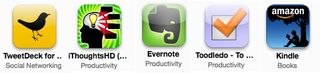
    My top ten most used 3rd-party iPad apps seem to be:

    1. TweetDeck (Twitter app)
    2. Kindle (eBook reader)
    3. iThoughtsHD (MindMap tool)
    4. Evernote (online notes and reference library)
    5. Toodledo (projects and tasks management)
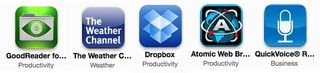
    6. Goodreader (PDF reader)
    7. The Weather Channel MAX+ (check the weather)
    8. Dropbox (online, multi-computer file storage)
    9. Atomic Web (multi-tab browser)
    10. QuickVoice (audio recorder)

    Ipad-apps2 

    Next on the list is to consider trying out some of the remote access solutions to see how well you can run a Mac or PC from the iPad.  If you have a favorite then please let me know.

    + , , , , , , , , , ,
  • The following is a summary of tweets posted to TechNewsRadio@Twitter over the last week:

    • This WEEK in GOOGLE42 bit.ly/9SYkfL Check out: Ribbit, Android Kindle app, Google Reader Play, Diaspora, Google Wave open to all
    • Per @LeviathanChrons the podcast novel "Leviathan Chronicles" has a big update on 5/26 http://bit.ly/8ZzfDq
    • Amazon has announced a Asia Pacific Region AWS datacenter in Singapore (EC2 S3 SimpleDB RDS SNS CloudWatch Cloudfront) http://bit.ly/9NMCNc
    • TechPodcast.com Roundtable is today – Sat. May 22nd at 1pm PT / 4pm ET – Stitcher Radio, Green Screen HowTo, 5 Top Windows Utilities
    • standardizing all my computers with Google Chrome as the default browser – it seems to be faster, more reliable, etc than Firefox
    • TweetDeck 0.3.4.1 seems like a nice upgrade: more meaningful icons, location, scheduled updates, translations, etc
    • OpenOffice.org is looking for proposals their 10th year conference in Budapest, Hungary from 08/31- 09/03/2010 http://bit.ly/b6d6cQ
    • Checking out Apple's "iPad : The Missing Manual—New from O'Reilly" – new book $25 – http://oreil.ly/90aNZO
    • Mark/Space has announced Android Calendar Sync Version 1.4 Beta bit.ly/aDLSrX
    • The new Apple OS X Snow Leopard Security Guide is now available online http://bit.ly/9Rm19H via PDF http://bit.ly/cSanMT
    • Slysoft.com has released AnyDVD6.6.4.2 with support for Avatar, more encryption updates & other fixes http://bit.ly/c0tub1
    • Willow Garage has a new open-source initiative for institutions and universities to build upon a robot platform bit.ly/9muTgs
    • OpenBook Specification for ePub (xhtml, css, etc) – some tools: Calibre & Adobe InDesign http://bit.ly/bGryk8
    • Just installed the new VMWARE 3.1 for Mac — reports about Bootcamp VMs being faster seem true – more info: http://bit.ly/vmware31
    • PhatWare has announced WritePad for iPad – an advanced handwriting recognition software http://bit.ly/aSuNXT
    • Checking out Tweekdeck v0.34.2 (upgrade from v0.34.1) — I wonder what is new?
    • Checking out PersonalBrain 5.5 (visual information management) for Mac, Windows, Linux http://bit.ly/bpWZ7Y [free 30 day demo]
    • AppleCentral.com is now the new "centralized" home for MacTech, Now Software, MacNews, MacsimumNews, MacMinute, etc
    • Manager Tools Effective Manager Conference at Denver Marriott City Center has been announced for June 7, 2010 http://bit.ly/akUuI3
    • SitePoint's newest book "Create Stunning HTML Email That Just Works!" looks like a good HTML intro: http://bit.ly/cs7ZCk
    • How to Upgrade Your MacBook's Hard Drive bit.ly/benw4m — Is a good reference!
    • Anyone interest in an Apple iPad meetup in San Diego, CA – Wednesday, June 9, 2010 http://bit.ly/985fSY
  • The following is a summary of tweets posted to TechNewsRadio@Twitter over the last week:

    • TechPodcast.com Roundtable is today – Sat. May 22nd at 1pm PT / 4pm ET – Stitcher Radio, Green Screen HowTo, 5 Top Windows Utilities
    • Standardizing all my computers with Google Chrome as the default browser – it seems to be faster, more reliable, etc than Firefox
    • TweetDeck 0.3.4.1 seems like a nice upgrade: more meaningful icons, location, scheduled updates, translations, etc
    • OpenOffice.org is looking for proposals their 10th year conference in Budapest, Hungary from 08/31- 09/03/2010 http://bit.ly/b6d6cQ
    • Checking out Apple's "iPad : The Missing Manual—New from O'Reilly" – new book $25 – http://oreil.ly/90aNZO
    • Mark/Space has announced Android Calendar Sync Version 1.4 Beta http://bit.ly/aDLSrX
    • This WEEK in GOOGLE42 http://bit.ly/9SYkfL Check out: Ribbit, Android Kindle app, Google Reader Play, Diaspora, Google Wave open to all
    • Per @LeviathanChrons the podcast novel "Leviathan Chronicles" has a big update on 5/26 http://bit.ly/8ZzfDq
    • Amazon has announced a Asia Pacific Region AWS datacenter in Singapore (EC2 S3 SimpleDB RDS SNS CloudWatch Cloudfront) http://bit.ly/9NMCNc
    • Just loaded up my old TabletPC with latest Ubuntu 10.4 LTS .. now I have OS X, Win7, Linux, & iPad running at home 😉
    • Per @georgestarcher you can trouble shoot PC/Windows problems with Ubuntu Live CD/USB [LifeHacker, How-To Geek] http://bit.ly/bKgaER
    • LaCinema Mini HD Connect is interesting High Definition Media Player with full HDMI, USB 2.0, and Network http://bit.ly/bvJDPT
    • TOM BIHN has introduced the Co-Pilot travel bag – sized specifically for travel essentials, including your iPad http://bit.ly/cdDPvP
    • SoundSoap 2.4 has been announced with many bug fixes & several enhancements plus a new 14-day trial version http://bit.ly/cnbTgD
    • Jason Westland book "The Project Management Life Cycle: A Complete Step-By-Step Methodology" has a software service via http://bit.ly/dtsMEK
    • How to Skip the Trailers and FBI warning on DVD players by @acedtect via CNET/videosift.com http://bit.ly/dm4aGL
    • On Monday, 5/3/2010 Apple announced that after only 28 days they sold more than 1 million Apple iPads http://bit.ly/blhTan
    + ,
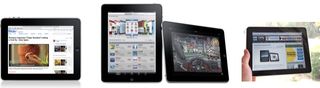
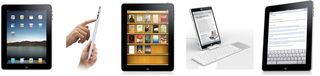
  • Ipad-mosaicAfter experiencing the Apple iPad for the last week, I thought I'd outline my thoughts on the device that seems to still have a lot of buzz and interest.

    In a nutshell, I am very happy with the iPad and I believe that it is a compelling device that fits in well between laptops/desktops and mobile phones.

    I believe this device is going to help me be more effective with reading, podcast & audio book listening, and consuming professional content in eBook, PDF, and other standard formats.  I expect it will also help me on the organizational front with more ubiquitous access to reference material, project support data, and communications services.  Plus, it will be a fun device to decompress with casual games, videos, and music.

    No device is perfect — says the former Newton & still TabletPC laptop fan. As I outlined in a previous blog post, I had some concerns with the hardware and software as proposed by Apple for iPad v1.0 before picking up the device. 

    The good news is that as far as I can tell there isn't anything new that the iPad can't do that wasn't already publicly announced before it was released. So, I don't have any buyer's remorse. I know there are now confirmed Wi-Fi issues, but I haven't experienced those with the Wi-Fi networks I have available to me.

    Things that are great:

    • The screen is awesome.
    • Battery life is equally impressive.
    • Bluetooth keyboard support is solid.
    • Surfing the web is fast and fluid on the screen with the pinch-to-zoom working as expected.
    • Books via Amazon's Kindle application are readable and easy to consume over hours of reading.
    • Physically the device is solid and feels good in your hands.
    • Goodreader.net is a very nice $0.99 application for reading PDFs.
    • The interface and applications run fast — so the custom Apple A4 processor was a very good idea IMHO.
    • The built-in Apple iPad applications are well designed.  The Email application with support for viewing a large number attachment formats is especially functional.
    • Native 3rd party iPad/HD applications look spectacular on the device. Some of the ones I've been using include: USA Today, Reuters, TweetDeck, The Weather Channel, Zino, Evernote, Toodledo, Kayak Flights, Dictionary, ABC Player, Yahoo! Entertainment, Sudoku Tablet, YouVersion Bible, and Box.net.
    • On screen keyboard is significantly better than my previous iPod Touch experiences.
    • Internal speaker is better than I expected and so is the microphone.
    • Doing a one on one demo with someone is pretty powerful for sharing and viewing information. The built-in Photos application is especially noteworthy as a good example.
    • Maps with Wi-Fi geolocation is remarkably accurate.
    • I haven't really ran into situations where multi-tasking would be an issue, but I can think of one area I am going to run into problems — browsing in Safari and then wanting to post via TweetDeck.

    Things that are not so great (from a consumer perspective):

    • Screen gets smudged very easily, but cleans up well.
    • Can't subscribe to podcasts directly in iTunes on the iPad.
    • The iPad could lose a half-a-pound in weight, and be more portable plus easier to hold over a longer period of time.
    • Pricing on new iPad specific applications is way to high in my humble opinion. Kudos to many of the application developers I currently use for creating 'free' upgrade versions.
    • The 2x upscale for standard iPhone apps leaves a lot of pixelation issues that distracts from the experience.
    • Safari has crashed more than I expected when consuming media files directly from sites like podcast RSS feeds.
    • I don't like having to sync to iTunes to get Contact updates.  You can get Google Calendar updates directly via CalDAV.
    • iBook prices appear to be on average more expensive than Amazon Kindle prices.  For instance, David Allen's "Getting Things Done (GTD)" is $9.99 on Amazon and $12.99 on Apple's iBook store.

    Things that are not great (from my own Enterprise work perspective):

    • No DOD PKI CAC support so you can't sign emails or read encrypted emails.  You also can't use many DOD sites without DOD PKI CAC support in the browser.  Plus at my organization, VPN access and authenticated WIFI is not currently possible without DOD PKI CAC support.
    • Currently there is no way to encrypt the whole device and/or all the application specific storage areas.  This will be a problem as Data At Rest (DAR) requirements become more prevalent and no longer optional.  I've heard rumors about possible 3rd party solutions being released soon that solves this type of problem but nothing definitive as I post this review.  If anyone knows anything about future iPhone/iPad DAR solutions, then please let me know.

    Other than fixing the items that are not so great, what could Apple do for improving iPad 2.0 hardware?  Here are a few suggestions:

    • More Bluetooth device support (i.e. networking, GPS, DOD CAC PKI, etc),
    • Integrate a native USB port,
    • Add an SD Card slot, and
    • Drop the price for all units by $100.

    I'm sort of ambivalent on adding the camera from a video conferencing/chat perspective, but I think the camera as a sensor to capture location views, barcodes, snapshots, etc would be useful.

    With recent news of the iPhone/iPad OS v4.0 coming out soon there is a good chance that many of the software issues will be either solved by this v4.0 release or an earlier v3.x release.  Given that the current release date for iPad support for v4.0 is Fall 2010, I'd expect a hardware update for the iPad when this actually comes out.  Regular Fall releases for new iPad hardware makes more sense for Holiday Sales, and future iPad release will probably be part of Apple's traditional new iPod releases usally in September or October.

    The one thing I have not had a chance to try out but would like to is using the iPad to remotely connect to Windows or Mac systems.   I think this could be a big business area for Apple when the 3G version comes out.  With this feature, businesses could leverage the iPad for mobile computing solutions like access to intranet applications, sales presentations, eLearning, etc outside their internal physically controlled Wi-Fi networks.  The only reason I haven't tried them out is the three that look good for evaluation had prices ranging from $15 to $35.  Apple and their developers really need a 'demo' option for items in their AppStore, especially for applications with high price tags. Spending money to do multi-product evaluations is not that appealing to me.

    Another thing worth noting is that there is definitely going to be more iPad-like products coming to the market in the near future. I think some of these will be pretty competitive, especially those with Google's Android and more than likely Microsoft's Windows Phone 7 Series.  The big change, when compared to the past, is that the iPad is based on an operating system geared for being mobile, and the full blown operating system software like those on previous TabletPCs is not the right answer for devices in this middle ground between laptops/desktops and mobile phones.

    Want to learn more? One of the better Apple iPad consolidated tips, tricks, and pointers articles is posted at HowToGeek.com (link via Kreg Steppe @ FriendsInTech.com)  Another tool that looks interesting is a Google Docs editing tool called Office2Pro that was recently reviewed on one of my favorite mobile technology blogs JK On The Run.

    If you have any comments, then please post them below and I'll definitely respond.  If you have any questions that you'd like to have answered, then you can send me email at: sholden@pobox.com or send me a Twitter message (@sholden) or on direct message on Facebook (sholden).

    + , , , , , , , , , , , , ,
  • Steve Holden at TechNewsRadio.com and his family do a dual unboxing of an Newton MessagePad 100 and a new Apple iPad 16-GB.

    http://blip.tv/scripts/pokkariPlayer.js?ver=2009070701 http://blip.tv/syndication/write_player?skin=js&posts_id=3458385&source=3&autoplay=true&file_type=flv&player_width=&player_height=

    Feel free to follow along with Steve Holden at: Twitter, FriendFeed, and/or Delicious.  For tech news only
    updates follow TechNewsRadio
    on Twitter
    .  You can also get other great podcasts and content at FriendsInTech.com.

    You can also watch the video on YouTube if you want.

    More information about the topics, products, etc can be reviewed via:

    This podcast is sponsored by
    SCOTTEVEST
    and Amazon.

    + , , , , , , ,
  • Steve's Best Practice for Technology Purchasing was developed during the Apple Newton years (1993-1997) as the editor and publisher of NewtNews – a weekly newsletter that covered the Newton marketplace and community.

    The basic premise is that Steve will never purchase the 1st generation of any technology product.  After what seemed like countless painful experiences buying every Newton device, software, etc. released, this best practice has proven very helpful over the last 13 years.  Some successes – TabletPC ( HP TC1100 vs HP TC1000) and Apple iPod Touch (2nd generation vs. 1st generation).

    Now that the Apple iPad is coming out (pre-orders start on March 12, 2010), I'm torn on whether or not to purchase the new iPad 1st Generation vs. the iPad 2nd Generation with a ton more features and more MTBF (mean time before failure) engineering. 

    I am pretty sure the Wi-Fi only model is better for me than the WiFi + 3G version so that decision is easy for me.  

    As a very happy iPod Touch (2nd generation) user I can really see how a bigger screen would be a major improvement.  And many of the applications that I use every day would seem to be very compelling on the iPad form-factor: Pandora, Evernote, Peggle, Facebook, TweetDeck, Stanza, Kindle, Toodledo, and Safari

    The other bonus is that I'm pretty much using my older HP TC1100 as an "iPad-tablet" device already.  In the morning as I'm getting ready for the day, I listen to news podcasts via iTunes, catchup with social media sites, and check in on my news feeds.  And then in the evening, some of the same activities happen.  But the iPad form factor (smaller, thinner, etc.) plus battery life will be an improvement.

    As a frequent traveler, the ability to watch videos, listen to podcasts, and ready books plus other references is a great improvement over the iPod Touch I'm currently using in this situation.

    The Bluetooth integration seems like another key feature both on the audio side of the house but also for keyboard input.  Sometimes you just need to use a real keyboard!

    As I write this and review what I've written, I get a sense I've already made enough case for the device at least for me. 

    But the one thing really bugging me is the lack of multi-processing support. When I'm using my current "legacy iPad" (aka the HP TC1100) I have several applications open and I like to bounce between them and also stream music from Pandora or other sources.  Reading something, capturing it, and then sending it out on Twitter or Facebook currently doesn't work well for me on the iPod Touch, and I'm thinking the same is going to be true about the iPad.  The iPad is a content consumer device not a content producer device.

    Well, I guess I'll need to make a decision soon or hold off.  To be honest I'm pretty sure I'm going to get one but I'm open to input.  If you have any, then please let me know!

    NOTE:  One killer application for the WiFi + 3G version is how well Citrix works on the iPad.  If it works without issue, then the platform will really be compelling for the Enterprise.  And that could make the iPad both a consumer and a business success.

  • The following is a summary of tweets posted to TechNewsRadio@Twitter over the last week:

    • checking out an old reference from my Evernote library – Digital Home Recording Tips, Part 1 – O'Reilly Media [bit.ly/cRgYOm]
    • For all you database guru's out there – Amazon SimpleDB now supports "consistent reads and conditional puts & deletes" [bit.ly/d2gHGk]
    • How to get Windows updates in an ISO image so you can burn them to DVD for systems not connected to the Internet [bit.ly/9JUsMS]
    • if you do internet based research & data analysis then you might want to check out Context Discovery
    • There is now a video library of content for igniteshow.com that is scheduled for March 1-5, 2010 across 60 locations on 6 continents
    • Checking out the new Beatweek (formerly iProng – music, new media, podcasting, mobile gear) fan page on http://www.facebook.com/beatweek
    • Opus.com has announced iMacros for Chrome – automates common tasks such as posting feedback, checking visitor statistics & downloading info
    • Dynamism.com has the new viliv S10 tablet computer with 10.1” HD LCD, multitouch swivel screen, Intel Atom CPU, 10 hour battery, optional 3G
    • the other "Steve Holden" is offering an online course Python 1: Beginning Python ($199) 
    • SlySoft.com has announced the AnyDVD (HD) 6.6.2.3 Update – this is a great Windows DVD copy/backup program that works well with Handbrake
    • Mark Minasi has shared some great Microsoft Active Directory tips related to ADSIEdit & LDAP 
    • VIZIO’s XVT Series HDTVs now come with integrated & upgradeable Internet Apps (Demand, Flickr, Netflix, Rhapsody, VUDU & Yahoo TV Widgets)
    • Oracle recently released VirtualBox 3.1.4 with improved stability & bug fixes.
    • OpenOffice.org Conference (OOoCon) will be from 08/31-09/03/2010 in Budapest, Hungary
    + , , , , , , , ,
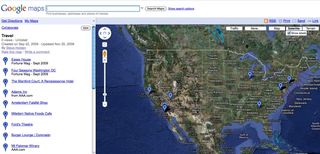
  • A recent question on the Getting Things Done (GTD) Virtual Study Group mailing list related to tracking travel related task & project items, reminded me that since this past summer I've been tracking geographical items of interest, reference, and someday/maybe items using Google Maps:

    Google-my-map-01

    The My Maps feature with Google Maps lets you create your own pins and references.  You can also make your maps public or private.  If you make a map private you can still send the private map as a link to someone else via email.

    I like this option because the next time I'm in Atlanta I'll know the options that are available to me.  And the data is available with any Internet access plus browser.

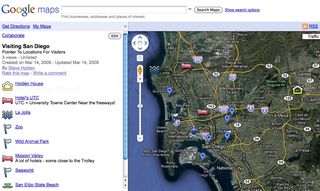
    I've also used this feature to build a Visiting San Diego Map for friends and family:

    Google-my-map-sd-01

    This has been very handy in helping visitors figure out what is available to do in San Diego County and how far away items are.

    + , , , , , ,